

Summary
If you want to learn how to spell on a calculator, choose a word that can be formed from calculator-style letters, convert each letter into its matching digit, enter the digits in reverse order, and rotate the calculator 180 degrees. For example, type 07734 and turn a traditional calculator upside down to display hELLO. Writing “I love you” exactly is not possible on most standard seven-segment calculators because the letters V, Y, and U do not have clear upside-down digit equivalents. However, you can use the familiar number code 143, which represents the number of letters in “I,” “love,” and “you.”
Calculator spelling is a simple form of visual wordplay that turns an ordinary math tool into a miniature message screen. This guide explains the complete number-to-letter mapping, the correct typing method, useful word examples, calculator limitations, display differences, and creative alternatives for writing messages such as “I love you.”
Table of Contents
- What Is Calculator Spelling?
- How to Spell on a Calculator: The Basic Method
- How to Write “I Love You” on a Calculator
- Calculator Number-to-Letter Mapping
- Words You Can Spell on a Calculator
- How to Make Your Own Calculator Words
- How to Spell on a Calculator Using Different Displays
- Upside-Down Versus Sideways Calculator Writing
- Why Some Calculator Words Do Not Work
- Calculator Spelling, Pager-Speak, and Leetspeak
- Calculator Word Games and Activities
- Conclusion
- Frequently Asked Questions
What Is Calculator Spelling?
Calculator spelling is a number trick in which digits typed on a calculator resemble letters when the calculator screen is viewed upside down. The user enters a numeric sequence, rotates the calculator 180 degrees, and reads the transformed digits in reverse order.
The method works especially well on an older standard calculator with a seven-segment display. Each number is created by illuminating selected bars or segments. When the screen is rotated, several digits resemble lowercase or uppercase letters from the Latin alphabet.
For example:
- 0 can resemble O
- 3 can resemble E
- 4 can resemble h
- 5 can resemble S
- 7 can resemble L
- 8 can resemble B
The technique is often called the upside-down calculator word game. Its more technical names are beghilos or beghilosz, formed from the main letters that calculator digits can represent: B, E, G, H, I, L, O, S, and sometimes Z.
Calculator spelling became a familiar school calculator trick because it required nothing more than a basic calculator, a short word list, and some imagination. Students could type secret-looking numbers, flip the device over, and reveal names, messages, jokes, or calculator word puzzles.
The resulting words are a form of ambigram-like visual wordplay. They are not always perfect ambigrams in the strictest artistic sense, but their symbols become readable from a different display orientation.
How to Spell on a Calculator: The Basic Method
Learning how to write words on a calculator requires four simple steps.
Step 1: Choose a Word That Uses Calculator Letters
Begin with a word made from letters that have recognizable digit equivalents. Good choices include:
- hello
- hill
- bell
- bees
- goose
- giggle
- shoes
- solo
- obsess
A word containing letters such as A, K, M, R, T, V, W, X, or Y usually cannot be reproduced accurately on a basic upside-down calculator.
Step 2: Convert Each Letter into a Digit
Use the traditional digit-to-letter substitution system:
- O becomes 0
- I or L becomes 1
- Z becomes 2
- E becomes 3
- H becomes 4
- S becomes 5
- G becomes 6
- L becomes 7
- B becomes 8
- Lowercase g may sometimes become 9
The exact letter resemblance can vary according to the font and shape used by the calculator display.
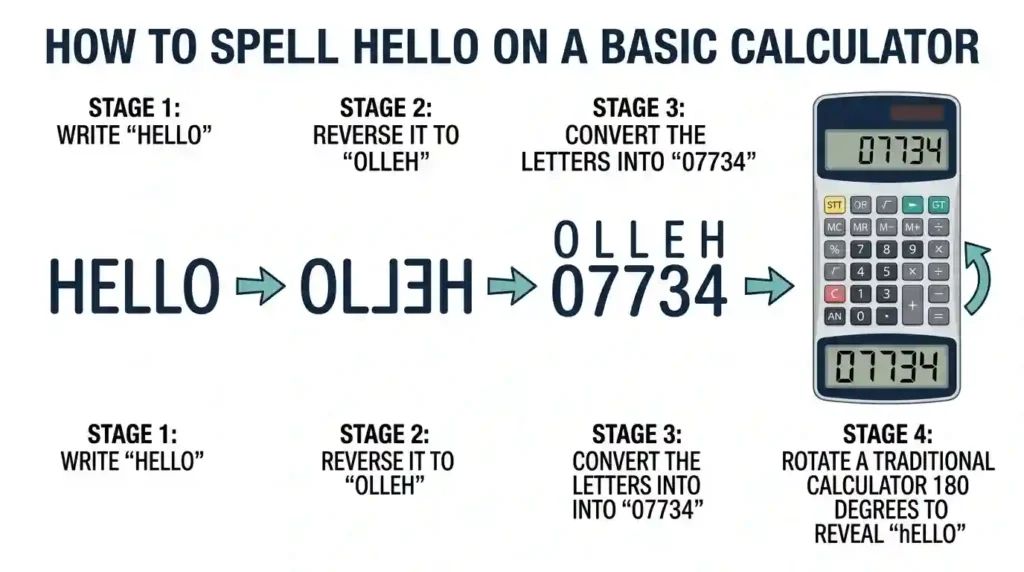
Step 3: Reverse the Letter Order
This is the most important step when learning how to type words on a calculator. Because rotating the calculator also reverses the direction in which the digits are read, you must enter the letters from the end of the word to the beginning.
For the word HELLO, start from the final letter:
O → L → L → E → H
Now convert those reversed letters into digits:
0 → 7 → 7 → 3 → 4
The final numeric sequence is:
07734
Step 4: Rotate the Calculator 180 Degrees
After entering the numbers, turn the calculator completely upside down. Do not simply tilt it or rotate it 90 degrees. A full 180-degree rotation changes the digits into recognizable letters and reverses their reading direction.
The number 07734 will now resemble hELLO.
The capital and lowercase appearance may be inconsistent because a seven-segment screen was designed to show numbers, not a complete alphabet. That imperfect look is part of the charm of calculator spelling.
How to Write “I Love You” on a Calculator
The phrase “I love you” is one of the most searched messages people want to create with calculator spelling. Unfortunately, it cannot be written exactly on a standard upside-down seven-segment calculator.
Why the Full Phrase Does Not Work
The phrase contains several supported letters:
- I can be represented by 1
- L can be represented by 7
- O can be represented by 0
- E can be represented by 3
However, a basic calculator does not provide convincing upside-down substitutes for:
- V
- Y
- U
Therefore, there is no universally accepted numeric sequence that becomes the complete phrase “I love you” after a 180-degree rotation.
Use 143 as the Classic Alternative
The most recognizable numerical alternative is:
143
The digits represent the number of letters in each word:
- 1 = I
- 4 = love
- 3 = you
This is not traditional upside-down calculator spelling. It is a numerical message code associated with pager-speak and earlier forms of short digital communication. Still, it is the easiest and clearest way to express “I love you” with calculator numbers.
You can enter 143 and show it to the person receiving the message. Unlike 07734, you do not need to turn the calculator upside down because the meaning comes from the number of letters in each word.
Other Love-Related Calculator Ideas
You can combine calculator spelling with a short romantic note:
- Type 143 for “I love you.”
- Type 07734 to say “hello.”
- Spell a supported nickname.
- Create a calculator word puzzle for your partner.
- Pair the calculator message with a handwritten heart.
Calculator tricks are intended for novelty and amusement, not for measuring a real relationship. If you want a different kind of playful activity, try a Love Calculator by Name or visit Love Calculator live for entertainment-based compatibility tools.
You can also explore a True Love Test on Paper, learn how to Do Love Percentage on Paper, or review Calculate Love Percentage by Name Methods. These games are designed for fun rather than scientific relationship prediction.

Calculator Number-to-Letter Mapping
The following table shows the most common number-to-letter mapping used for upside-down calculator words.
| Digit | Common letter | Appearance after rotation |
| 0 | O | Looks like a rounded or rectangular O |
| 1 | I or L | Resembles a narrow vertical letter |
| 2 | Z | May resemble a stylized Z |
| 3 | E | Becomes an angular uppercase E |
| 4 | H or h | Usually resembles a lowercase h |
| 5 | S | Forms an angular S |
| 6 | G | Often resembles a lowercase g |
| 7 | L | Forms an uppercase L |
| 8 | B | Looks like an uppercase B |
| 9 | g | Works only on certain display styles |
Why One Digit Can Represent Multiple Letters
A calculator digit does not transform into an actual letter. The connection depends on visual similarity. For that reason, digit 1 may be interpreted as I or L, while digit 6 may resemble G or a lowercase g.
Different calculator manufacturers also use slightly different segment shapes. An older display might omit part of the 6 or 9, changing the letter it appears to form.
The Role of the Leading Zero
A leading zero matters in words that end with O before reversal. For example, HELLO becomes 07734. Some calculators remove a zero entered at the beginning of a number, which may leave the word incomplete.
If your calculator automatically removes the leading zero, try one of these options:
- Enter a decimal point before the zero.
- Perform a calculation that produces a displayed leading zero.
- Use an online seven-segment display simulator.
- Choose a calculator that retains zeros entered before other digits.
The best solution depends on the calculator’s input behavior and display capacity.
Popular Words You Can Spell on a Calculator
Once you understand the reverse letter order, you can create many upside-down calculator words.
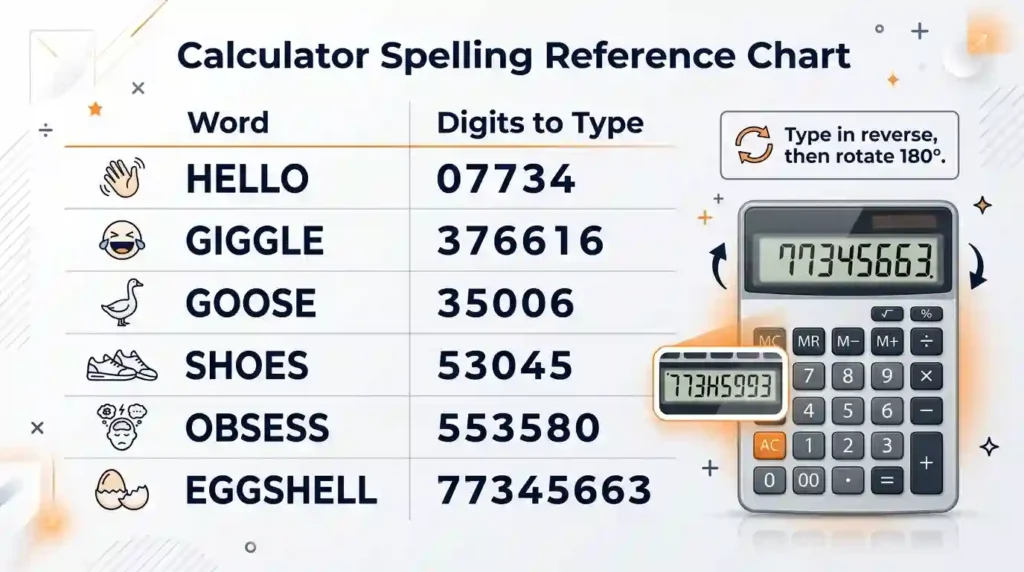
| Word | Digits to enter |
| hi | 14 |
| hello | 07734 |
| hill | 7714 |
| bell | 7738 |
| belle | 37738 |
| bells | 57738 |
| bee | 338 |
| bees | 5338 |
| beg | 638 |
| gig | 616 |
| giggle | 376616 |
| goose | 35006 |
| shoes | 53045 |
| solo | 0705 |
| boil | 7108 |
| bliss | 55178 |
| obsess | 553580 |
| eggshell | 77345663 |
How to Spell HELLO on a Calculator
Enter:
07734
Rotate the calculator 180 degrees. The display will read approximately:
hELLO
The number 07734 is probably the best-known family-friendly calculator spelling example because every digit has a clear letter resemblance.
How to Spell GIGGLE
Start with the word:
GIGGLE
Reverse its letter order:
ELGGIG
Convert the reversed letters:
- E = 3
- L = 7
- G = 6
- G = 6
- I = 1
- G = 6
Enter:
376616
Turn the calculator upside down to reveal GIGGLE.
How to Spell OBSESS
Reverse OBSESS:
SSESBO
Convert each letter:
- S = 5
- S = 5
- E = 3
- S = 5
- B = 8
- O = 0
Enter:
553580
Rotate the screen to read OBSESS.
How to Spell EGGSHELL
The word EGGSHELL is often mentioned as one of the longer familiar beghilos words.
Reverse it:
LLEHSGGE
Convert the letters:
- L = 7
- L = 7
- E = 3
- H = 4
- S = 5
- G = 6
- G = 6
- E = 3
Enter:
77345663
The word requires eight digits, so it fits the display capacity of many standard pocket calculators.
How to Make Words on a Calculator
You do not have to memorize a complete printable word list. You can create your own calculator words by following a repeatable process.
Use Only the Available Letter Set
Start with the basic beghilosz limited alphabet:
B, E, G, H, I, L, O, S, Z
Some displays also allow variations involving D or a lowercase g. However, the most dependable results come from the core letters.
Check Every Letter in the Word
Suppose you want to spell a name. Check whether every letter has a matching digit. If the name contains unsupported letters, it cannot be written accurately using the traditional upside-down method.
For example, LEO can work:
- L = 7
- E = 3
- O = 0
Reverse LEO to OEL, convert it, and enter:
037
However, MARK cannot work on a basic seven-segment calculator because M, A, R, and K have no standard upside-down digit equivalents.
Reverse Before Converting
A common mistake is to convert the word first and then type the digits in normal reading order. The safest process is:
- Write the word.
- Reverse the letters.
- Convert the reversed letters into digits.
- Enter the digits.
- Rotate the display.
For BELLS:
- Original word: BELLS
- Reversed word: SLLEB
- Digits: 57738
- Rotate the calculator to read BELLS
Test the Result on the Actual Calculator
The appearance of digits differs across an LCD display, LED display, fluorescent display, or older Panaplex display. A numeric sequence that looks convincing on one device may appear less readable on another.
Test your word before using it in a game or sharing it with someone. Pay particular attention to 1, 2, 4, 6, and 9, which can vary the most between calculator fonts.
How to Spell on a Calculator Using Different Displays
Traditional calculator spelling depends on hardware and display design. Not every calculator produces the same visual effect.
Seven-Segment Display
A seven-segment display uses seven bars arranged in a figure-eight pattern. Selected bars illuminate to create digits from 0 to 9.
This is the ideal display for upside-down calculator spelling because its angular digits resemble a limited set of letters after rotation. For a technical overview of how seven-, fourteen-, and sixteen-segment systems display characters, see this reference on segment displays.
LCD Display
A basic liquid crystal display, or LCD display, is common in pocket and school calculators. Many LCD calculators use recognizable seven-segment digits and work well for calculator words.
However, modern LCD screens can also use custom fonts or matrix-based characters. In those cases, the reversed digits may not resemble the traditional letters.
LED Display
An LED display produces brighter digits by illuminating light-emitting segments. Older LED calculators often create excellent upside-down words because their characters are bold and angular.
Fluorescent Display
Vacuum fluorescent displays were common in older electronic calculators. Their bright segmented numbers can work well for calculator spelling, although the exact shapes vary by model.
Panaplex Display
Panaplex displays use gas-filled segmented characters and have a distinctive orange glow. They are associated with older calculators and electronic equipment. Because the digits remain segmented, they may also support the classic number trick.
Matrix Screen
A matrix screen uses a grid of pixels instead of seven fixed segments. It can display more detailed numbers, symbols, and letters.
Ironically, a more advanced matrix screen may make traditional calculator spelling less effective. Its digit shapes may be too polished or may not transform into recognizable letters after rotation.
14-Segment and 16-Segment Displays
A 14-segment display or 16-segment display can form many actual letters. These systems may not require upside-down writing at all.
They provide more flexibility than the restricted beghilos alphabet, but they change the nature of the trick. Instead of using letter resemblance after rotation, they can display alphanumeric characters directly.
Scientific Calculator
A scientific calculator may use a traditional number display, a matrix screen, or both. Some models allow letters to appear as variables, while others include hexadecimal mode.
If the calculator uses a seven-segment number line, the basic trick may work normally. On a high-resolution scientific calculator, the result depends on the selected font and display mode.
Calculator Watch
A calculator watch can also support calculator spelling if it has enough buttons and a segmented display. The main limitation is its smaller display capacity, which may restrict the length of the numeric sequence.
Using Hexadecimal Mode to Write More Letters
Some scientific and programming calculators offer hexadecimal mode. The hexadecimal number system uses:
- Digits 0–9
- Letters A–F
Because hexadecimal digits already include the letters A, B, C, D, E, and F, this mode increases the number of possible words.
This type of writing is closer to hexspeak than traditional upside-down calculator spelling. Words are formed by combining hexadecimal digits with numbers that resemble letters.
For example:
- 0 may represent O
- 1 may represent I or L
- 5 may represent S
- 7 may represent T
- A–F appear as actual hexadecimal letters
The available options depend on whether the calculator accepts and displays hexadecimal letters. Some models permit A–F only through special function keys.
Upside-Down and Sideways Calculator Writing
A 180-degree rotation is the standard method, but some people experiment with sideways writing.
Rotating 90 Degrees Counterclockwise
When the calculator is turned 90 degrees counterclockwise, digits may resemble a different group of symbols. Depending on the font:
- 0 may resemble O
- 2 may resemble N
- 3 may resemble M
- 4 may resemble J
- 5 may resemble U
- 7 may resemble C
- 8 may resemble an infinity symbol
These interpretations are less consistent than standard upside-down spelling.
Rotating 90 Degrees Clockwise
A clockwise 90-degree rotation creates another possible character set. For example, certain digits may resemble N, W, R, or J.
Sideways writing provides more creative freedom, but the result depends heavily on the viewer’s imagination and the shape of the calculator screen. It is better for experimental visual wordplay than for messages that need to be read instantly.
Which Orientation Is Best?
Use a 180-degree rotation for the clearest and most widely recognized calculator words. Use sideways writing only when the selected digits produce an obvious message on your specific display.
Why Some Calculator Words Do Not Work
Calculator spelling has several practical limitations.
The Alphabet Is Restricted
Only a small part of the Latin alphabet has convincing digit equivalents. This prevents many common names, phrases, and sentences from being displayed.
Words Must Be Entered Backward
The numeric sequence must reflect reverse letter order. If you type digits in the same order as the original word, the rotated result will also appear backward.
Display Fonts Differ
The digit 4 may resemble H on one screen but look unclear on another. Similarly, 6 and 9 can have open or closed shapes that affect whether they resemble G, g, b, or q.
Leading Zeros May Disappear
Some calculators automatically remove a leading zero. This can cause a word such as HELLO to lose its final O after rotation.
Display Capacity Limits Word Length
Many traditional calculators show eight or ten digits. A word requiring more digits will not fit on the screen.
Separators Can Interrupt the Word
Commas, decimal points, minus signs, or exponential notation may break the appearance of the final word. Clear the screen and enter only the intended numeric sequence.
Modern Displays May Be Too Advanced
A matrix-based scientific calculator may render digits in a font that does not resemble letters when inverted. In this case, an older basic calculator may actually work better.
Calculator Spelling, Pager-Speak, and Leetspeak
Calculator spelling is related to several other forms of number-based communication, but they are not identical.
Calculator Spelling
Calculator spelling relies on physical rotation and visual similarity. The user enters reversed digits and turns the display upside down.
Example:
07734 → HELLO
Pager-Speak
Pager-speak uses number codes to represent words or messages. The numbers may relate to letter counts, sound, shape, or an agreed meaning.
Example:
143 → I love you
The calculator does not have to be rotated because the code carries the meaning.
Leetspeak
Leetspeak replaces letters with visually similar numbers and symbols. It became closely associated with early online communities and digital culture.
Common substitutions include:
- 3 for E
- 4 for A
- 5 for S
- 7 for T
- 0 for O
- 1 for I or L
Leetspeak is normally read in its original orientation. Calculator spelling requires reversed digits and an upside-down display.
Hexspeak
Hexspeak forms words from hexadecimal digits, particularly A–F, sometimes combined with numbers that resemble letters. It is frequently associated with programming and memorable computer values.
These systems overlap because they all use number-to-letter mapping, but their rules and purposes differ.
For more entertaining relationship-related games and explainers, browse Love Calculators & Compatibility.
Calculator Word Games and Learning Activities
Calculator spelling can become more than a single number trick. It can support puzzles, classroom activities, and creative challenges.
Decode the Number
Give players a numeric sequence and ask them to identify the word after rotating it.
Examples:
- 07734
- 53045
- 35006
- 376616
Encode the Word
Provide a supported word and ask players to produce the correct reversed number.
This activity tests:
- Letter recognition
- Sequencing
- Reverse order
- Pattern matching
- Visual reasoning
Find the Longest Word
Give players an eight-digit display limit and challenge them to create the longest recognizable word using the beghilosz alphabet.
The display capacity prevents unlimited answers and makes the challenge more interesting.
Create a Printable Word List
A printable word list can include three columns:
- Original word
- Reversed letter order
- Calculator digits
This structure helps beginners understand the conversion instead of simply memorizing numbers.
Design a Calculator Story
Students can enter several calculator words in sequence and use each revealed word as part of a short story. The activity combines vocabulary, imagination, and visual problem-solving.
Compare Calculator Displays
Try the same word on:
- A basic LCD calculator
- A scientific calculator
- A calculator watch
- A phone calculator
- An online seven-segment simulator
Compare which display produces the clearest letter shapes and discuss why the results differ.
Common Mistakes to Avoid
Forgetting to Reverse the Word
Always reverse the letter order before converting the letters into digits.
Turning the Calculator the Wrong Way
Rotate the calculator 180 degrees. A 90-degree turn produces sideways symbols rather than traditional upside-down words.
Choosing Unsupported Letters
Check that every letter has a recognizable calculator digit. One unsupported letter can make the entire word unreadable.
Omitting a Leading Zero
Words such as HELLO require the first zero in 07734. If the calculator removes it, the displayed word will be incomplete.
Assuming Every Calculator Uses the Same Font
Test the word on your actual device. Letter resemblance is influenced by segment shape, spacing, and screen design.
Confusing 143 with Upside-Down Spelling
143 means “I love you” because of word length. It is a pager-style number code, not a word created by rotating calculator digits.
Conclusion
Learning how to spell words on a calculator is easy once you understand the central rule: choose supported letters, reverse the word, convert the letters into digits, enter the numeric sequence, and rotate the screen 180 degrees.
The classic example is 07734, which becomes HELLO when viewed upside down. Other fun choices include GIGGLE, GOOSE, SHOES, OBSESS, and EGGSHELL. These words work because their letters fit within the limited beghilos or beghilosz alphabet created by a seven-segment display.
Although “I love you” cannot be displayed exactly on most standard calculators, 143 provides a familiar numerical alternative. It communicates the phrase through word length rather than upside-down letter shapes.
Whether you remember calculator spelling as a school trick or are discovering it for the first time, it remains a clever example of how people transform simple technology into puzzles, jokes, and secret messages.
Frequently Asked Questions
How do you spell words on a calculator?
Convert each supported letter into a digit, type the word in reverse order, and rotate the calculator 180 degrees.
How do you write “I love you” on a calculator?
Enter 143, where 1 means “I,” 4 means “love,” and 3 means “you.” It is a number code, not an upside-down spelling.
What number spells HELLO on a calculator?
Type 07734 and rotate the calculator upside down. The digits will resemble HELLO.
Why do calculator words have to be typed backward?
Rotating the calculator reverses the reading direction, so the digits must be entered in reverse letter order.
What letters can you make on a calculator?
The most common letters are B, E, G, H, I, L, O, S, and Z, collectively associated with the term beghilosz.
Can you spell your name on a calculator?
Only if every letter in your name has a recognizable digit equivalent on the calculator display.
What does 143 mean on a calculator?
It means “I love you” because the three words contain one, four, and three letters.
What is 07734 upside down?
When displayed on a traditional seven-segment calculator and rotated 180 degrees, 07734 reads HELLO.
Do calculator words work on phone calculators?
Sometimes, but many phone calculators use fonts that do not resemble traditional seven-segment letters when rotated.
What is the longest word you can spell on a calculator?
The answer depends on the accepted letter mapping and screen capacity. EGGSHELL, entered as 77345663, is a popular eight-letter example.